farzad528.github.io
Personal Website
mldangelo.com and serverless mldangelo.github.io/personal-site
My personal website. Easily modifiable, and built using modern javascript with Node.js, React, Express, React-Router, Hot Module Reloading, Webpack and many other technologies.
The master branch of this repository contains a simplified version of my website intended for serverless hosting on github pages. To view the source for the version hosted at mldangelo.com, checkout the server branch.
A note on adapting this repository to your own personal website
Many people have contacted me about adapting this website. I have tried to make things as simple as possible. There are still bugs. I am sorry. If you find a bug, please email me (help@mldangelo.com) or submit an issue or a pull request.
Dependencies
Tested with:
- node >= v12, v14. nvm recommended for managing node versions.
Set up
You may wish to fork this repository or remove my remote origin and add your own. Go here for more information on how to change remotes.
-
To download the repository and install dependencies, run the following commands:
git clone git://github.com/mldangelo/personal-site.git cd personal-site nvm install npm install -
Next, you should create a
.envfile. To do this, run:cp sample.env .envand set values as appropriate. Most people will not need to make changes.
-
Run the following command to build the react application and serve it with hot module reloading:
npm run devNavigate to
<ip>:<port>default: http://localhost:7999 to view my website.This completes set up instructions. Please continue reading to learn how to modify this site to make it your own.
Checklist
- Start by changing text in the sidebar. This file is located at
app/components/Template/Nav.js. - Add an image of yourself in
public/images/me_icon.jpg. If you decide to change the filename, be sure to go back to the sidebar and change the image path there as well. - Modify the text in
app/views/Index.js - Modify the files in
app/data/resume/next. When you’re finished, go back and modify all of the other files in theapp/data/directory. - You’ve finished modifying >95% of the pages. Search through the rest of the files for references to
MichaelorAngeloand change values to your name. - Change the description in
server/views/index.tpl.html. You may also wish to add a new favicon or remove it. This website may be helpful. -
Decide how and where you are going to host this project. I recommend purchasing your own domain name from Google Domains. If you would like to host on github pages, run
npm run deploy. This will generate a new branch calledgh-pages. Then go tohttps://github.com/[your github username]/personal-site/settingsand configure accordingly: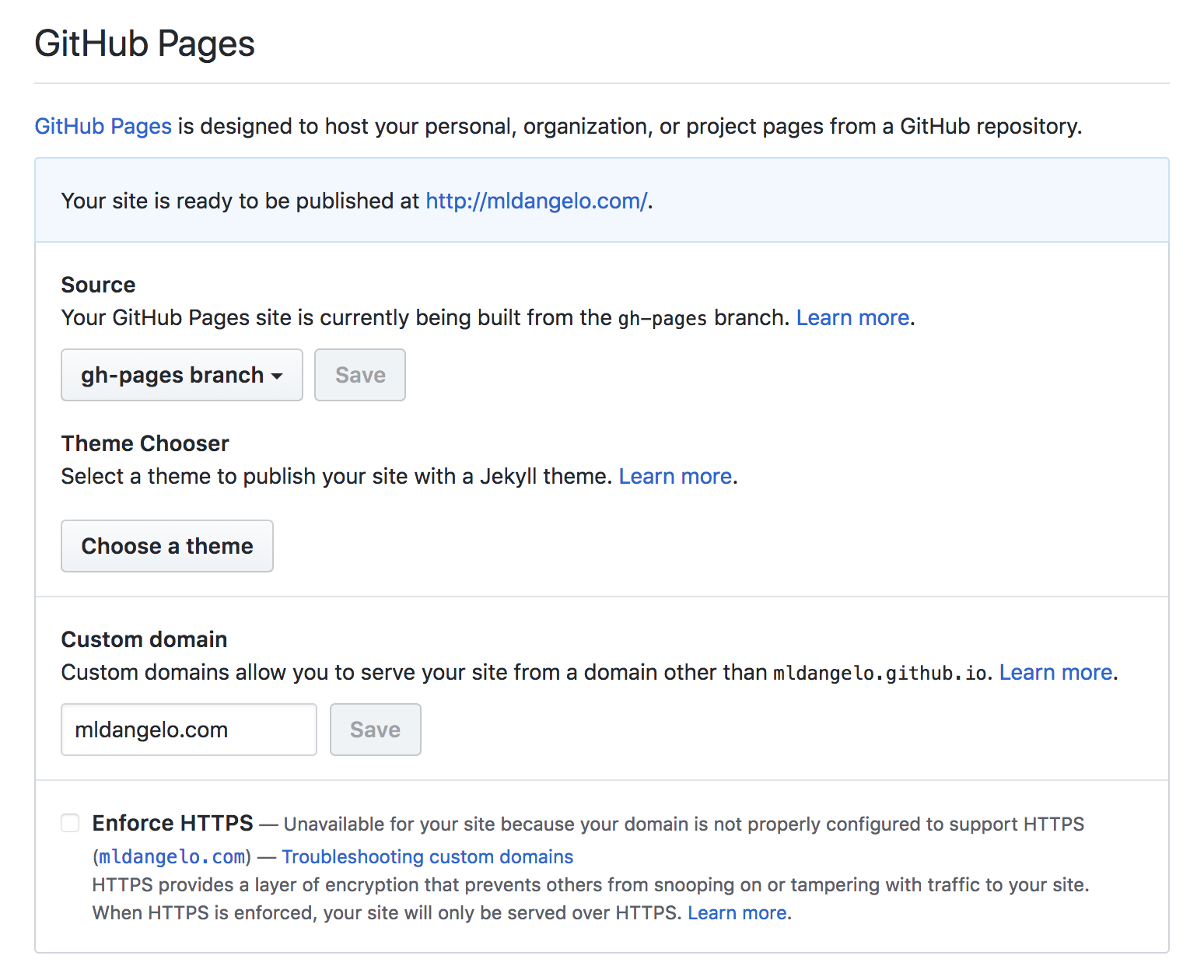
- Configure your domains DNS record. See here for more information.
- Change
homepageinpackage.jsonto reflect where you plan to host the site. This is important for react-snap. If using a custom url, modify the CNAME file to point to your URL. If you plan to deploy to a /[path] (e.g. https://mldangelo.github.io/personal-site/), you should modifyBASE_PATHin your.envandsample.envfiles and restart the express server. Note that you will now have to navigate tolocalhost:[port]/[BASE_PATH]when developing.
Deploying to Github Pages
- Change
NODE_ENVtoproductionin.env - Run
npm run deploy
That’s it.
Please feel free to reach out to me by filing an issue or at help@mldangelo.com for help configuring your project.
Contributors
Acknowledgements
- Special thanks to @typpo for tirelessly answering all of my node.js and react questions.
- Template based on Future Imperfect by @ajlkn for HTML5 UP.